使用claude-monitor监听claude用量 #
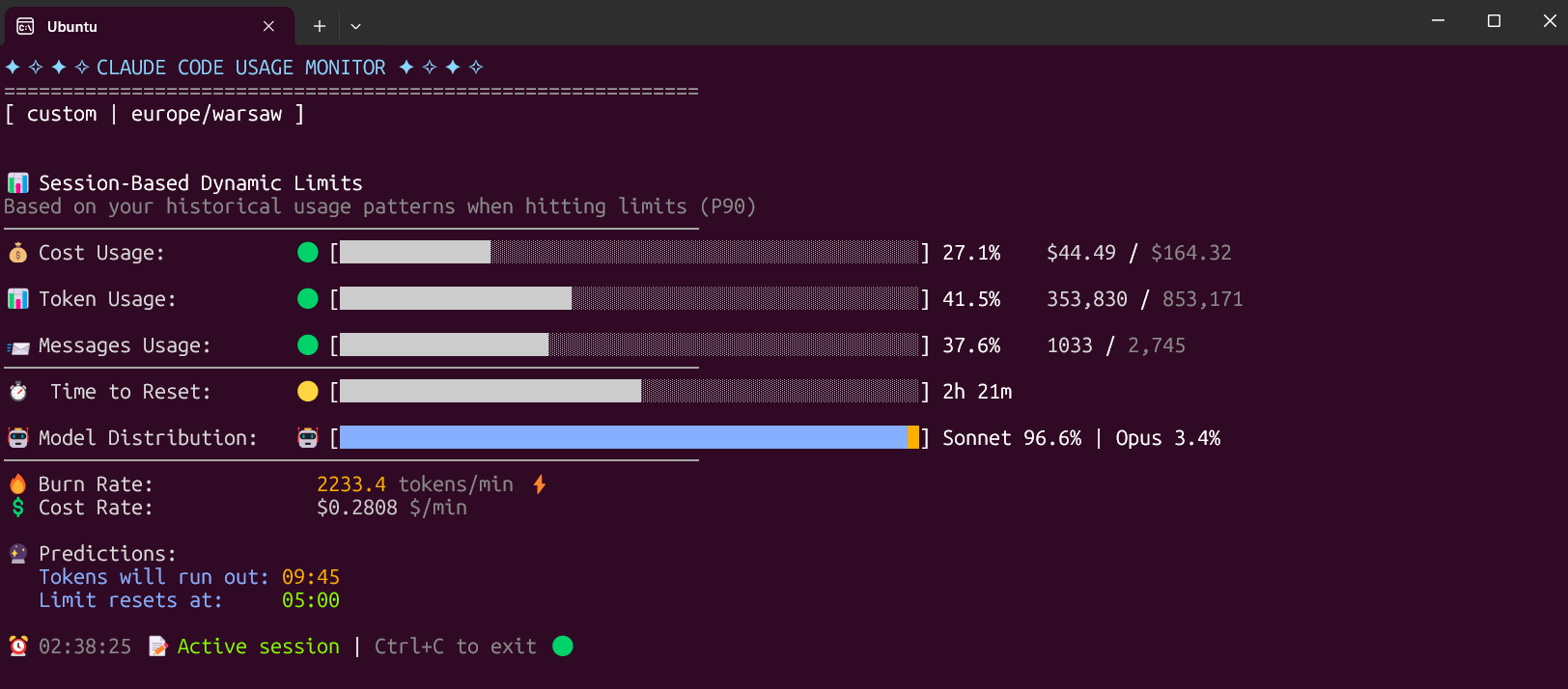
监控Claude AI的token使用情况,显示剩余额度和使用速度。
功能 #
- 实时监控token消耗
- 预测剩余时间
- 费用统计
- 超额警告
安装 #
推荐使用uv:
# 安装uv
curl -LsSf https://astral.sh/uv/install.sh | sh

# 安装监控器
uv tool install claude-monitor

# 运行
claude-monitor
或使用pip:
pip install claude-monitor
claude-monitor
使用 #
基本命令:
# 默认运行
claude-monitor

# 选择套餐
claude-monitor --plan pro     # Pro套餐
claude-monitor --plan max5    # Max5套餐
claude-monitor --plan max20   # Max20套餐

# 查看帮助
claude-monitor --help
套餐选项 #
| 套餐 | Token限制 | 费用限制 | 说明 |
|---|---|---|---|
| pro | 19,000 | $18.00 | Pro订阅 |
| max5 | 88,000 | $35.00 | Max5订阅 |
| max20 | 220,000 | $140.00 | Max20订阅 |
| custom | 自动检测 | $50.00 | 智能适配(默认) |
问题排查 #
安装问题 #
如果pip安装失败,推荐使用uv或pipx。
运行问题 #
如果显示"No active session found",先在Claude中发送几条消息。
许可证 #
MIT许可证 - 可自由使用和修改
项目地址:https://github.com/Maciek-roboblog/Claude-Code-Usage-Monitor